Email outreach
What the Email outreach section does, what each page is for, and what is and is not connected today.
Email outreach sends a short sequence of emails to a list of leads from your own mailboxes, collects the replies in one place and lets you turn a good reply into an opportunity. Nothing is sent until a person approves it.
The pages
Open Email outreach in the left rail. It holds seven pages.
| Page | What it is for | Guide |
|---|---|---|
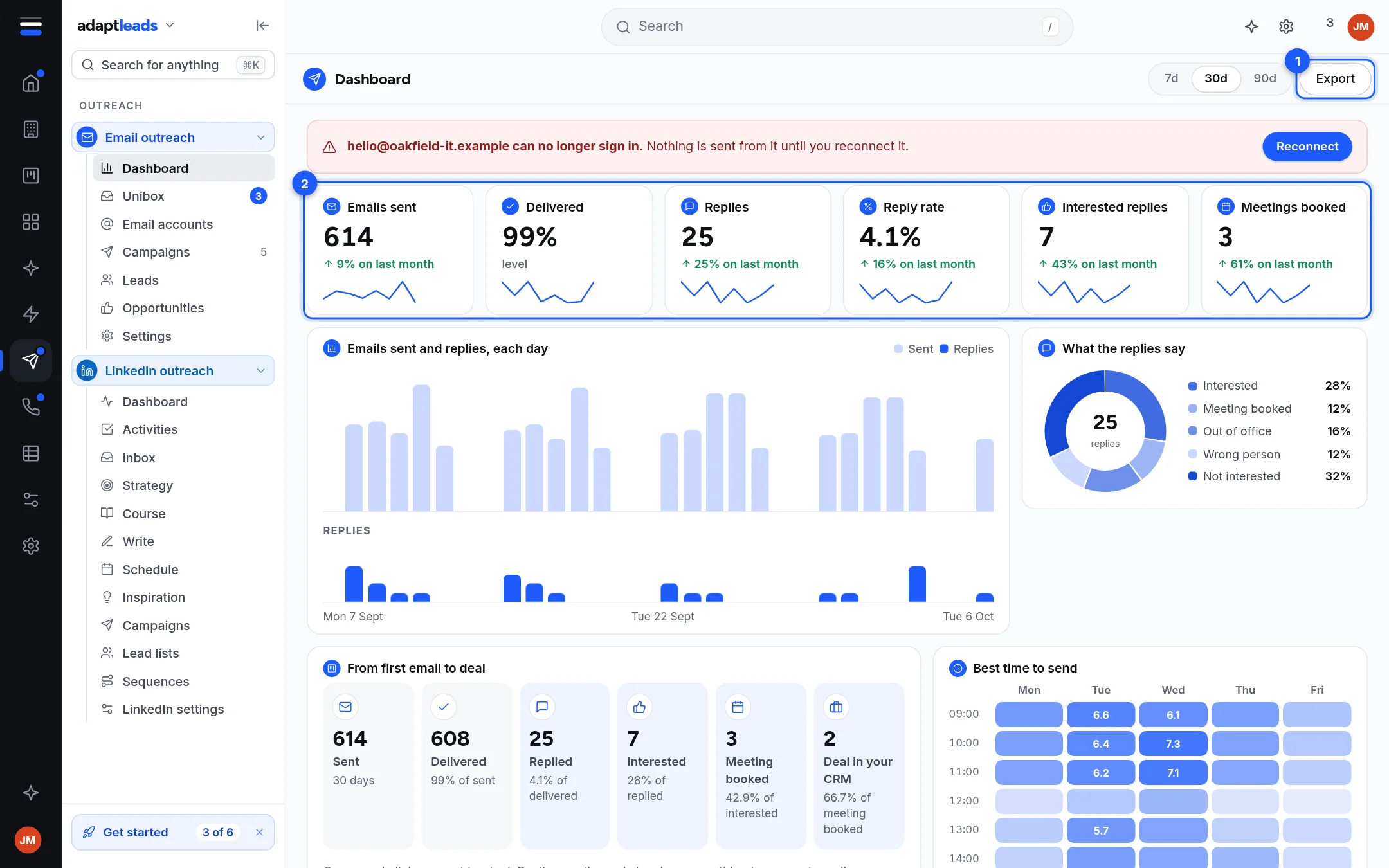
| Dashboard | Totals for emails sent, replies and what the replies said, plus mailbox health | Read the Email dashboard |
| Unibox | Every reply from every mailbox, with its tag | The Unibox: read and sort replies |
| Email accounts | The mailboxes you send from, their warm-up and health | Connect a mailbox |
| Campaigns | Each sequence, its leads, schedule and limits | Campaigns |
| Leads | Everyone you have loaded for email, 200 to a page | Leads in a campaign and on the Leads page |
| Opportunities | Replies that turned into interest, with a value and a status | Opportunities from email replies |
| Settings | Workspace name, reply tagging and notifications | Email outreach settings |
How a campaign goes from nothing to sent
- Connect a mailbox and turn its warm-up on. Give a new mailbox at least two weeks.
- Make a campaign (a draft) and add leads.
- Write the emails and set the schedule and limits.
- Send yourself a test, run the spam check, then approve the exact content.
- Launch. Follow-ups go out on their own days. A reply stops the follow-ups for that lead.
The short version with every click is in Build your first email campaign.
What is not there
- Replying inside the app. You write the reply in the Unibox, then copy it or open it in your mail app. See The Unibox: read and sort replies.
- An automatic unsubscribe link. Adapt does not add one. You must write an opt-out line yourself. See Unsubscribes and the do-not-email list.
- Opens and clicks. They are not tracked, on purpose. The reply rate is the number to watch.
- Microsoft 365 or Outlook mailboxes, bulk mailbox import, extra schedules, per-company limits and plain-text-only sending.
- A template library for email. You can duplicate a campaign. See Templates and saved email copy.
The law, in one paragraph
Cold email to businesses in the UK is governed by PECR and UK GDPR. Emailing a limited company is treated differently from emailing a sole trader. Adapt does not screen anyone against a register. This is guidance, not legal advice: read The rules for cold email, PECR and UK GDPR before you launch.
- Adapt Outreach is not open for this sign-inWhat the message means when the Email outreach pages show a padlock instead of your campaigns, and what to do.
- Read the Email dashboardWhat each tile, chart and panel on the Email outreach dashboard shows, and which figures the app does not count.
- Connect a mailboxConnect a Google or other IMAP and SMTP mailbox to send campaigns from, and what to do when it will not connect.
- Sending domains, SPF, DKIM and DMARCWhat a sending domain is, what SPF, DKIM and DMARC mean in plain words, and where Adapt shows their result.
- Warm up a mailboxWhat warm-up is, how to turn it on and tune it, and what the app does and does not do about it.
- CampaignsThe Campaigns page, a campaign's five tabs, and what each status means.
- Build your first email campaignEvery click from an empty campaign to a launched one, in order.
- Write the steps and set the delaysHow steps, delays and the email editor work on a campaign's Sequences tab.
- Variables and personalisationWhich variables fill in from a lead, how to give a fallback, and what happens when one is unknown.
- Test two versions of an email (A/B variants)Add up to three variants of a step, and what Adapt does with them.
- Set the schedule and sending hoursChoose the days, the hours and the time zone a campaign sends in, and what the schedule does not control.
- Sending limits and why they existThe daily limit, the random daily range, the gap between emails and the other options on the Options tab.
- The spam check and the copy rulesWhat Run spam check looks at, which rules block a campaign, which only warn, and how to pass.
- Approve and launch a campaignThe checklist, the approval a person must give, and what the launch confirmation says will go out.
- Pause, resume or stop a campaignHow to stop sending at once, start again, or take a campaign out of your list, and what each does to leads.
- Leads in a campaign and on the Leads pageWhere email leads come from, the Leads page, a campaign's Leads tab, and what each lead status means.
- Import leads for email from a CSV, a paste or a listUpload a CSV, paste addresses or send a list from Adapt Leads, and what happens to people on your do-not-email list.
- The Unibox: read and sort repliesWhere every reply lands, how folders, tags and filters work, and what you can and cannot do with a reply.
- Handle a replyRead a reply, answer it from your own mail app, and turn it into an opportunity or stop emailing the person.
- Opportunities from email repliesHow a reply becomes an opportunity, the statuses, the value, and what Qualify and hand over does to your CRM.
- Templates and saved email copyThere is no email template library yet. Duplicate a campaign to reuse its steps, and know what is copied.
- Writing emails with AdaptHow campaigns written for each lead work, what Adapt writes, what it checks, and what the assistant cannot do yet.
- Unsubscribes and the do-not-email listAdapt does not add an unsubscribe link for you, how to give people a way out, and how the do-not-email list works.
- Bounces and email status labelsWhat a bounce is, how Adapt shows it, and what Verified, Catch-all server, No answer and Will not deliver mean.
- Reports and what the numbers meanEvery figure Email outreach really shows, how it is worked out, and what it cannot tell you.
- Deliverability basicsThe habits that keep cold email out of spam, and the tools in Adapt that help you check.
- The rules for cold email, PECR and UK GDPRPlain-words guidance on emailing businesses and sole traders in the UK, and what Adapt does and does not do for you.
- Email outreach settingsThe workspace name, reply tagging, notifications and language on the Email Settings page, and what is not there.