Write a LinkedIn post
Write a post as LinkedIn shows it, check it, then save it as a draft, schedule it or post it.
Write is where you write one post, see it as LinkedIn will show it, and save, schedule or post it.
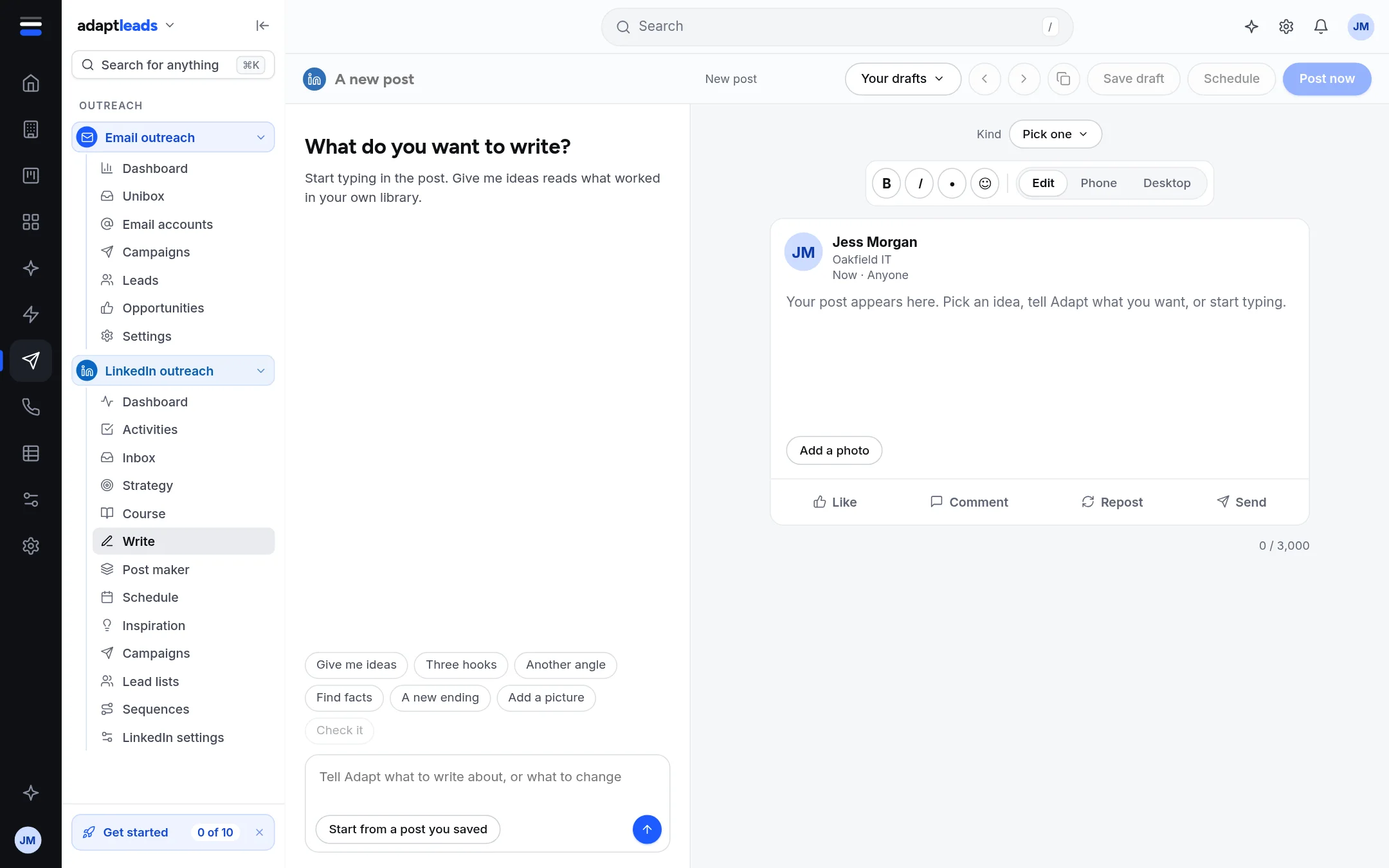
The page
On the right is the post as it will look, with Edit, Phone and Desktop buttons. Phone and Desktop fold the text where LinkedIn folds it ("see more"), so you can see what shows before the click. The limit is 3,000 characters, shown at the bottom. At the top you choose a Kind (one of your kinds of post from Strategy and plan), open Your drafts, and use Save draft, Schedule and Post now.
On the left is a conversation with Adapt, with these buttons: Give me ideas, Three hooks, Another angle, Find facts, A new ending, Add a picture and Check it.
| Button | What it does today |
|---|---|
| Give me ideas | Offers starting hooks drawn from posts in your own library (the ones you saved or read). Use one and it is added at the top. |
| Check it | Runs the checks below. Also runs by itself as you type. |
| Add a picture | Opens the The Post maker. A LinkedIn post cannot carry that picture yet, so you download it and add it on LinkedIn. |
| Three hooks, Another angle, Find facts, A new ending | Not connected yet. They need a writer Adapt does not have. |
| Tell Adapt what to write or change | Not connected yet. Write it in the box. |
| Start from a post you saved | Opens a saved post's shape from Inspiration, with your own words to fill in. |
The checks
As you type, two sets of checks run.
- Against the rules, in your browser: the first line fits on a phone (about 140 characters), one sentence per line, space between lines, no hashtags, no link in the post (put it in the first comment).
- The wording, from the server: your publishing rules and your library. Anything that Stops it going out is marked in red. If dashes are found, a button offers Use the version without dashes.
A post that breaks a publishing rule is not sent, even on a schedule. That check runs when a post is published, not only on this page.
Saving
Your draft is kept in this browser as you type, so it follows you if you leave the page. It is not on the server until you save it.
- Save draft keeps it on your Schedule with no time.
- Schedule asks for a day and time in your own time zone and a kind of post, then Schedule it. The window is up to a year ahead.
- Post now asks first, then publishes straight away, but only when LinkedIn posting is connected. See How LinkedIn posts go out.
A post that has already gone out is never saved or sent again from here. New post starts a clean one and asks first if you have text that is not saved anywhere else.