The Post maker
Make a LinkedIn picture or carousel in your own brand and download it.
The Post maker makes a picture or carousel for LinkedIn from a template, your words and your brand, entirely in your browser.
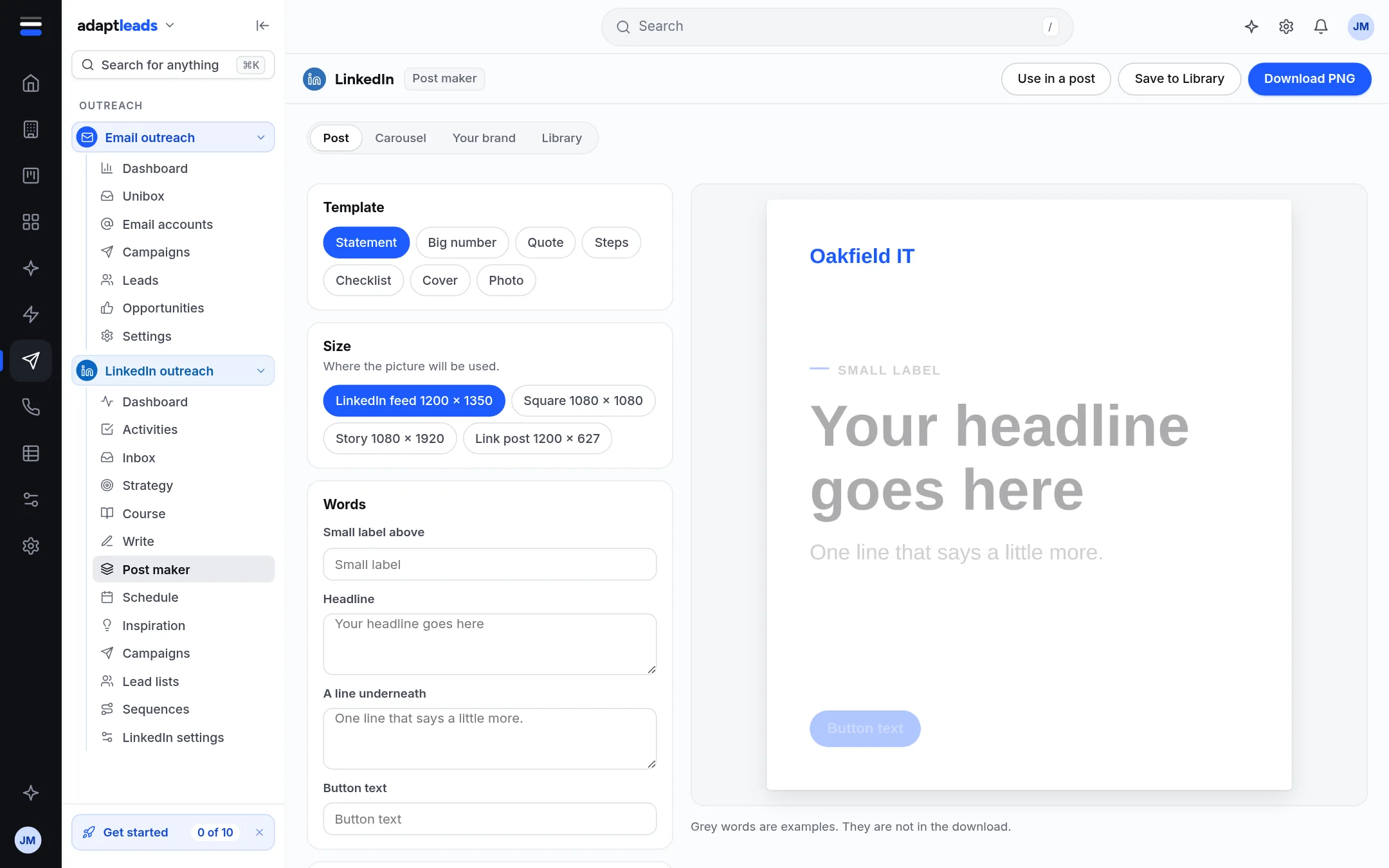
What you choose
- Template: Statement, Big number, Quote, Steps, Checklist, Cover or Photo.
- Size: LinkedIn feed 1200 x 1350, Square 1080 x 1080, Story 1080 x 1920, or Link post 1200 x 627.
- Words: the fields the template asks for, such as a small label, headline, a line underneath and button text.
- Your brand: logo, colours and font (Clean, Classic or Bold), and a Light, Dark or Your colour look.
- Tabs along the top: Post, Carousel, Your brand, Library.
Grey words in the preview are examples. They are not in the download. An empty field is empty in the file.
Getting the picture out
Download PNG saves the picture. A carousel can also be downloaded as a PDF of all the slides. Save to Library keeps it in your Library tab.
Where your data stays
The picture is drawn on a canvas in your browser. Nothing is uploaded to make it. Your brand kit is kept in this browser only, starting from the Branding set in Settings if there is one.