Find businesses
How the Businesses page works, part by part, from the first visit to the results table.
Businesses is where you search the UK book for companies. Open it from The UK book in the left rail.
The first visit
The first time you open it, with no filters on, the page asks "Who are you looking for?" and shows no table yet.
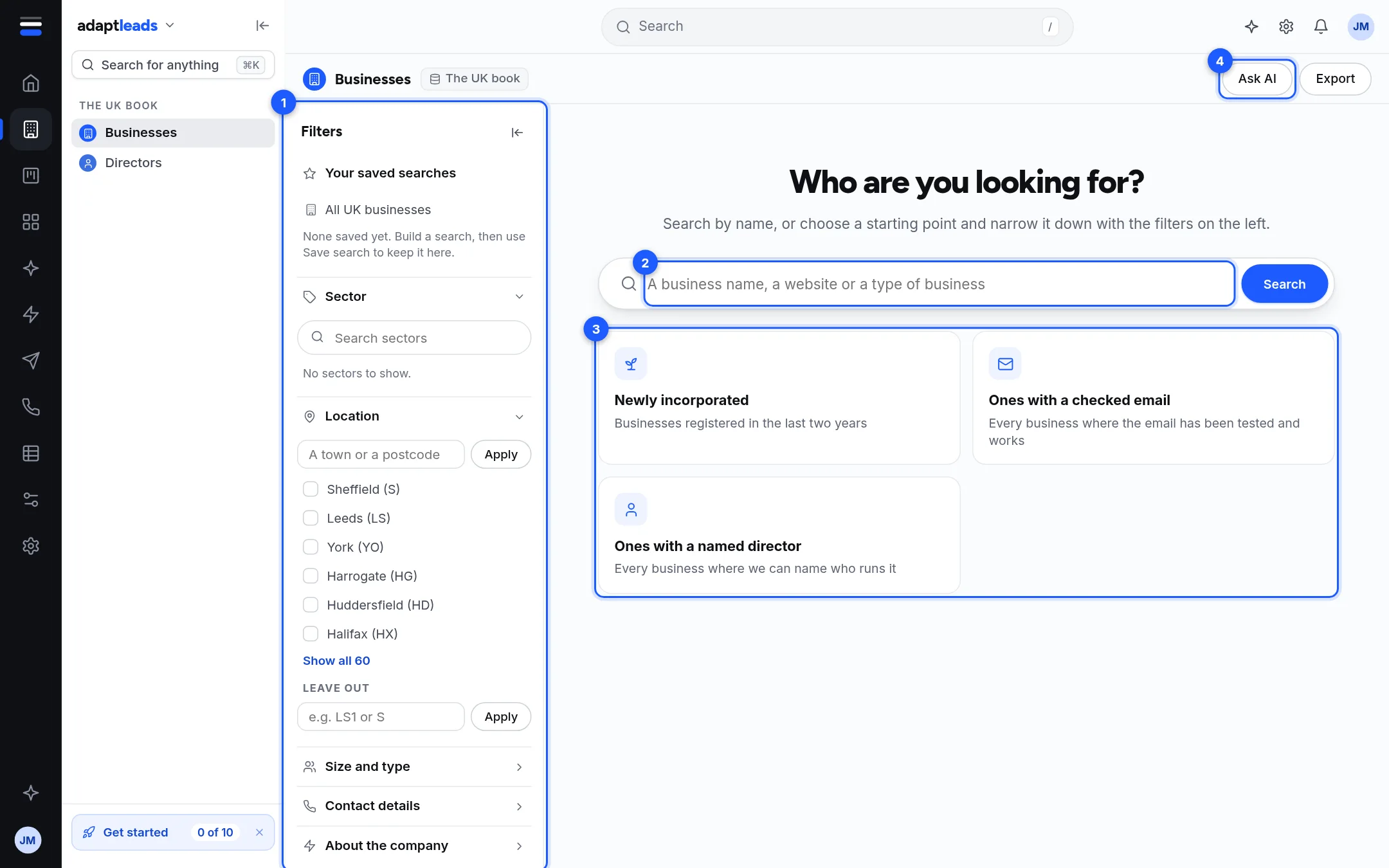
- Filters. The panel on the left. See Every filter on Businesses and Directors.
- Search box. Type a business name, a website or a type of business, then press Search.
- Starting points. Four cards, each a ready-made search.
- Ask AI. Opens a side panel where you describe who you want. See Search by describing who you want (Ask AI).
The cards are:
| Card | What it searches |
|---|---|
| Newly incorporated | Businesses registered in the last two years |
| The businesses you sell to | The sectors and place you saved as your ideal customer. It only appears if you have saved one in Adapt Insights. |
| Ones with a checked email | Businesses where the email has been tested and works |
| Ones with a named director | Businesses where we can name who runs it |
Under the cards, your own saved searches appear as buttons you can open. See Save a search and open it again.
The results page
Once any filter is on, or you have searched, the page shows a table.
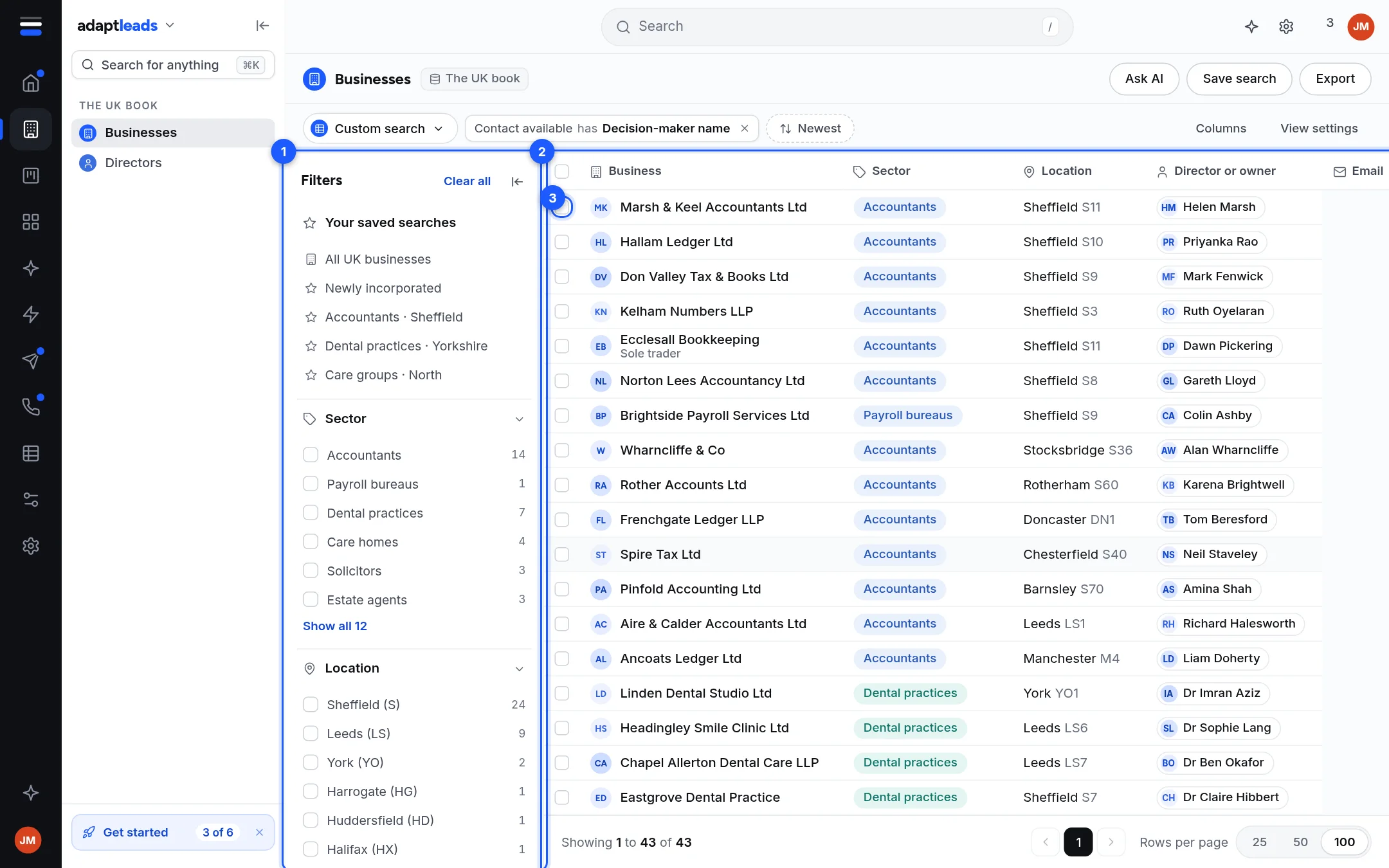
- Filters. Still on the left. Hide the panel with the arrow at its top; a narrow Filters strip stays so you can bring it back.
- The table. One row per business.
- Tick boxes. Tick rows to act on several at once. See Tick rows and act on several at once.
Above the table is a bar with the name of the search, a chip for every filter, the sort, a search box and Columns.

The columns
| Column | What it shows |
|---|---|
| Business | The name. A small line under it says "Part of" a group (with how many locations), "Registered as" another name, or "Head office". |
| Sector | The kind of business. |
| Location | The town and the first half of the postcode. "Not held" if we have neither. |
| Director or owner | A named person, or "Not named yet". |
| "Email on file" with small labels, or "No email on file". The address itself shows after you reveal. | |
| Phone | "Phone on file" with the kind of line (Mobile, Landline, Freephone and so on), or "No phone on file". |
| Website | The website, or "None found". |
| Record | Small pills: On the register, Trading address confirmed, Registered charity. "Not matched yet" if none apply. |
| Contact | Reveal, or a green Revealed pill. |
You can turn the optional columns on and off. See Choose columns, sort and page size.
Opening a record
Click anywhere on a row, other than a link, a button or the tick box, and the business record opens as a full page. Its arrows step to the previous and next business in your results. See Read a company record.
Notes the page may show
- Nothing matched ... exactly, so these are the closest matches. Your words found nothing, so Adapt widened the search. It tells you what it searched for instead. If it set aside some contact filters to find matches, it says so.
- Did you mean. Buttons with similar business names. Click one to search it.
- This sector also brings in. Choosing a sector can include its sub-sectors. Each appears as a chip with a cross. Click the cross to leave that one out.
- Rows hidden by your suppression list. See Suppression and do-not-contact on lists and searches.
Paging and size
The footer says "Showing 1 to 25 of N". Choose 25, 50, 100 or 200 rows per page. Your default comes from Settings. Only the first 10,000 matches can be paged; the footer tells you to narrow the filters to reach the rest.
What does not happen
- Looking at a page writes nothing and costs nothing.
- Your filters are kept while you stay signed in on this browser tab. They are not kept on another device. To keep a search for good, save it.
If the results do not look right, see Record and search problems, by message.