Every filter on Businesses and Directors
Each filter in the Filters panel, what it does, and what the number beside a choice means.
The Filters panel on the left of Businesses and Directors is built from five sections. Click a heading to open or close it. A small number on a heading says how many filters in that section are on. Every filter you set appears as a chip above the table, and each chip has a cross to remove it. Clear all at the top of the panel removes everything.
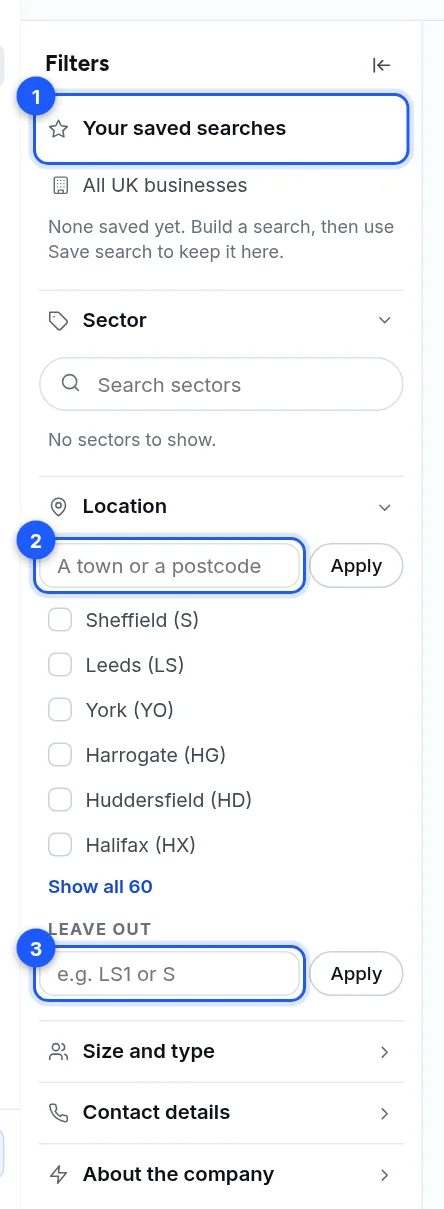
- Section headings. Sector, Location, Size and type, Contact details, About the company.
- A town or a postcode. Type it and press Apply.
- Leave out. A postcode area you do not want.
On the Directors page the sector section is called "Their company's sector", and the order of sections differs a little. Everything else is the same.
Sector
Search for a sector by typing in Search sectors, then tick one or more. Ticked sectors move to the top, then come the sectors in your saved feed and saved searches, then the rest from A. Only six show at first; Show all opens the rest.
A sector can bring in its sub-sectors. They appear as chips under the table's bar, and you can leave any of them out.
One search takes only so many sectors. If you hit the limit the page says "That is as many sectors as one search can take. Take one off first."
Location
| Control | What it does |
|---|---|
| Town or postcode box | Searches that place. Type a town name or a postcode and press Apply or Enter. |
| Postcode area list | Ticks one area by its letters, for example Sheffield (S). One area at a time. |
| Leave out | Removes a postcode area, for example LS1 or S. |
Size and type
| Filter | Choices | Meaning |
|---|---|---|
| Company size | Small, Medium, Large | From the accounts each company files. A business that files none has no size. |
| Company type | Independent, Multi-site, Head office | Pick several. |
Contact details
Contact available (tick any number of these):
| Choice | Finds businesses that |
|---|---|
| Verified email | Hold an email the mail server accepted |
| Owner or director email | Hold an email for the owner or a director |
| Business email (any) | Hold a general business email |
| Decision-maker name | Have a named director or owner (not shown on Directors, where it is already on) |
| Phone number | Hold a phone number |
| Website | Hold a website |
| Social profiles | Hold a social profile |
Email status: Verified, Catch-all server, No answer, Will not deliver. This is what the receiving mail server said when we checked the address. See Email labels explained: Verified, Catch-all server and the rest.
About the company
| Filter | Meaning |
|---|---|
| Part of a chain or group | Businesses that belong to a group |
| Registered away from where it trades | The registered office is somewhere other than the trading address |
| On the company register | Matched to an official company registration |
| Newly incorporated: In the last two years | Registered in the last two years |
| Founded | The year of incorporation, from and to. Years before 1850 are treated as 1850. |
| People on file | At least and at most. It counts the people we hold for the business, not how many it employs. |
The numbers beside a choice
Next to many choices is a small number. It is how many businesses in the whole UK book match that choice on its own, not how many match together with your other filters. It is read when you open the section and kept for six hours. When the book cannot say, there is no number, never a guess.
What the filters cannot do
- They cannot filter by job role or by legal form (limited company, partnership and so on). Those are not offered.
- Saved searches keep only some filters. See Save a search and open it again.
- A filter set can be too narrow. The page says so and offers Clear all filters.