Wrong numbers and corrections
How a caller flags a record that is wrong, and how you review those notes in the Corrections tab.
A caller who learns something the record does not hold taps one chip. It is logged with their name and sent back for a person to review. It never changes the record by itself.
What a caller can flag
Under The business, Something wrong with this record? has five chips:
| Chip | Meaning |
|---|---|
| Better number | You were given a different number that works. You are asked to type it. |
| Who to ask for | You found the right name. You are asked to type it. |
| Wrong person | The name on the record is not who you need. |
| Address is wrong | They have moved, or it was never right. |
| Wrong trade | The business is filed under the wrong kind of work. |
The chips are locked until the call has started. A caller under time pressure with one phone call is good evidence and poor proof, so a person decides what the record says.
If the number rang a different business, the outcome is Wrong number, not a flag. Do not ring them again to confirm.
Review them: the Corrections tab
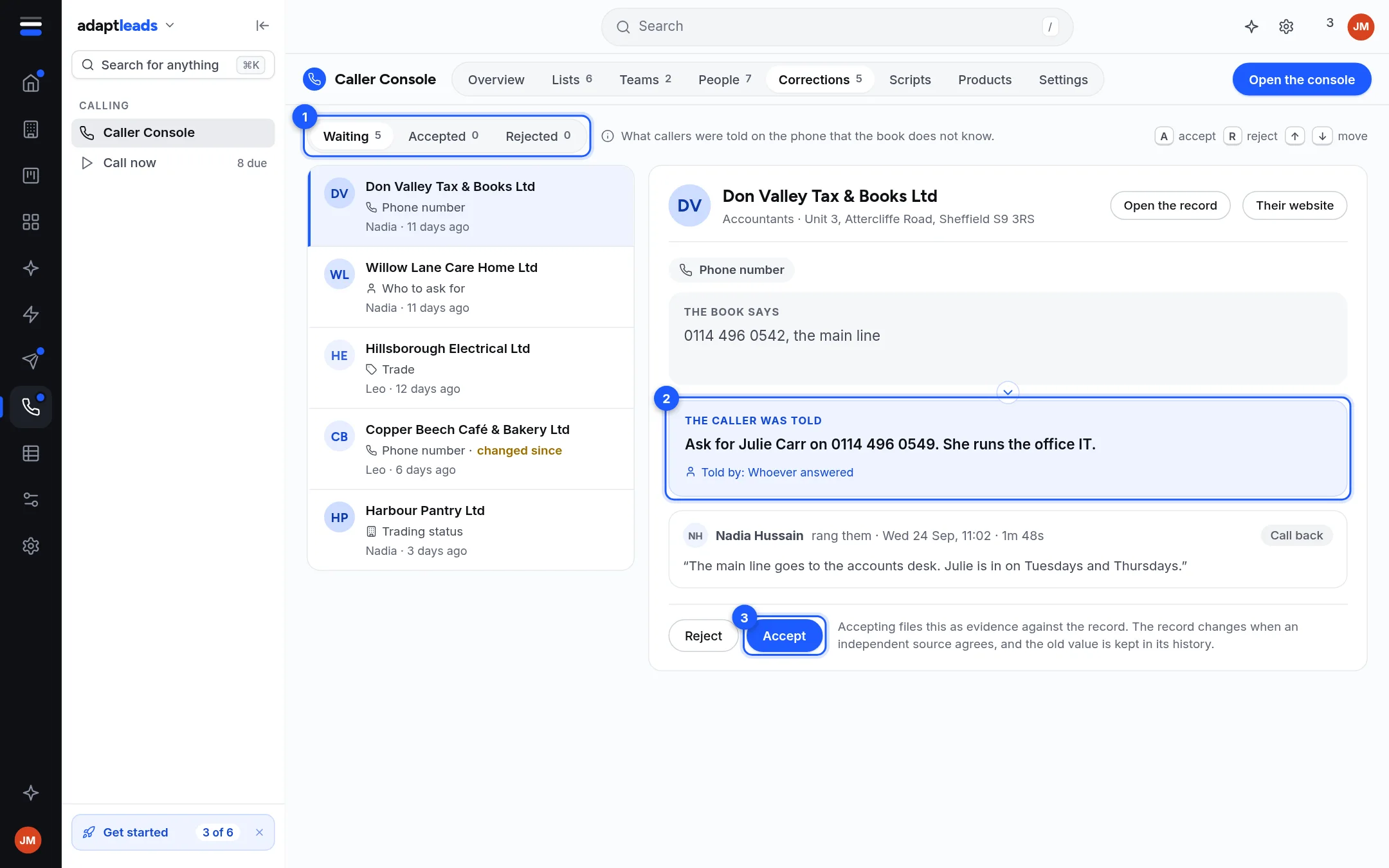
- Open Caller Console, then Corrections.
- Pick one from the left. Waiting, Accepted and Rejected (1) show each pile with its count.
- Read what the record holds, the caller was told (2), who told it, and the caller's note and call time. Use Open the record or Their website to check.
- Press Accept or Reject (3). Keys:
Aaccept,Rreject, the arrow keys move.
A row marked changed since means the record changed after the caller flagged it. Accepting then may undo somebody else's work, so check first.
What accepting does
Accepting files the caller's note as evidence against the record. The record changes when other evidence agrees, and the old value is kept in its history. It is not an instant edit. Rejecting keeps the note and leaves the record alone.
The Overview tab's Worth a look list also tells you how many corrections are waiting.
About the picture
The sample shows a made-up business and a made-up caller.