The team view in the Caller console
One page per calling team with calls, answered share, handed over and calls by day, plus the manager's pages.
A team is a group of callers who ring for one product or purpose. Their callers see the team's name at the top of every screen.
On Adapt Leads: the Teams tab
Caller Console, Teams lists your teams. Open one for its page.
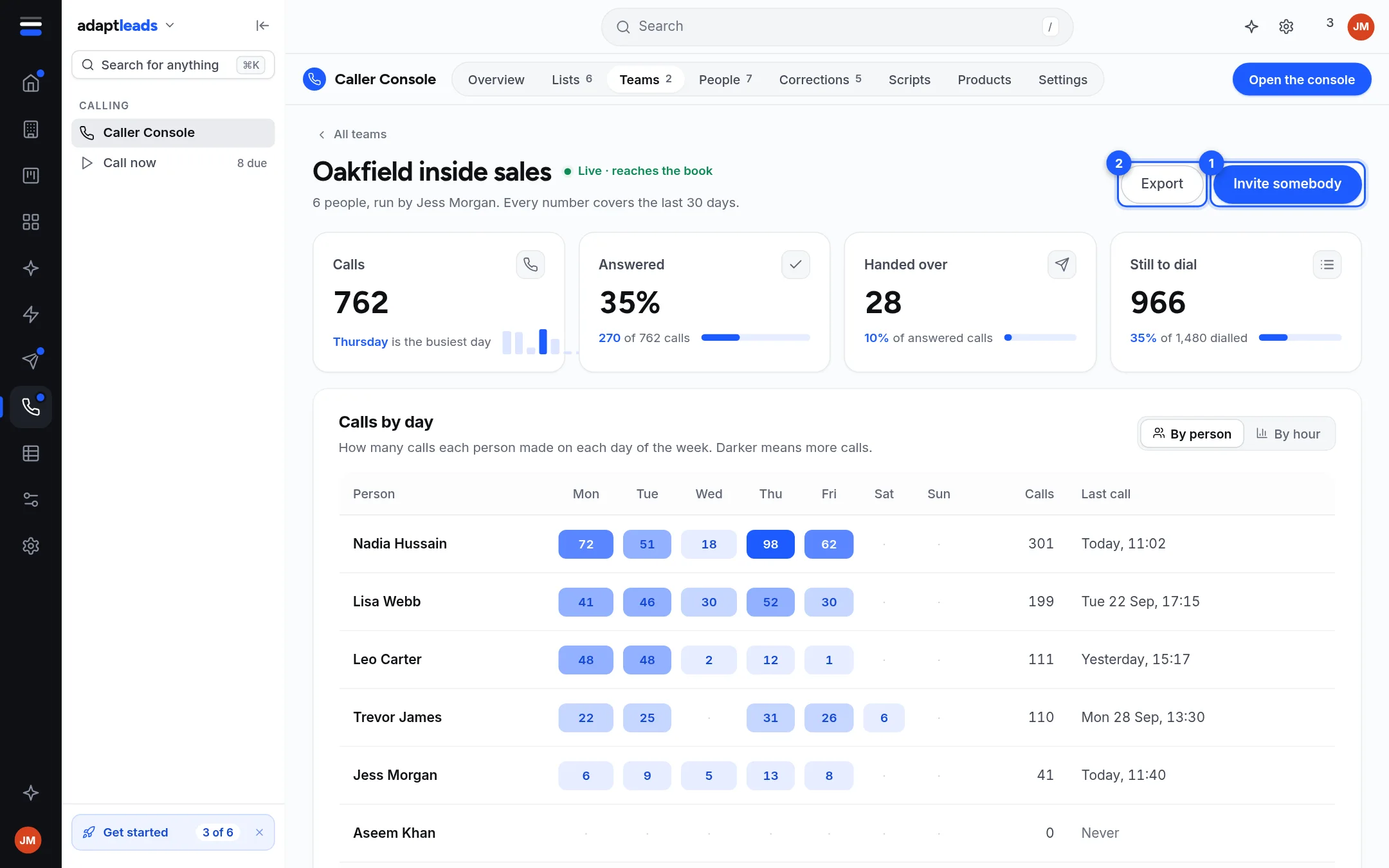
| Part | What it shows |
|---|---|
| Title line | The team name and Live · reaches the book. A demo team is marked as one. Anything a live team logs comes back to Adapt Leads. |
| Calls | Calls in the period, and the busiest day. |
| Answered | Share of calls where someone answered. |
| Handed over | Calls that ended Interested or Sale, as a share of answered calls. |
| Still to dial | What is left of what the team holds. |
| Calls by day | How many calls each person made on each day of the week. Darker means more. By hour is in the design but is not drawn in the live app. |
| Invite somebody (1) | Invites a manager. See Invite and remove callers. |
| Export (2) | Not connected yet. It is meant to give you the team's calls as a spreadsheet. |
Every number covers the last 7, 30 or 90 days, whichever the page is set to.
Create a team
- In Teams, press New team.
- Name it, using the name the callers call themselves.
- Press Create the team. It is live from the start, so what its callers log reaches Adapt Leads.
- Invite the manager next.
A team with no calls can be removed. A team that has logged a call cannot be removed from this page, only archived, and Recover for archived teams is not connected yet.
In the callers' console: the manager's pages
A team manager sees everything a sales exec sees, plus four pages:
| Page | What it is |
|---|---|
| Lists | Hand lists to people. Click a name and it takes effect at once, with no save button. |
| People | Add and remove the team. |
| What was said | Notes from Interested and Sale calls, with what was learned. Anyone who asked not to be called and any record a caller says is wrong show here too. A reading list, not a queue. |
| Promises | Every call back the team has booked, soonest first. A manager can hand one to someone else. |
| Results | Calls made, got through, answer rate, handed over, corrections, a table by person, and Worth a look. See Caller reports and the Overview tab. |
A sales exec cannot create a lead, edit the book, hand work to anyone else, or see another caller's records. Those screens do not exist for them.