Set up Adapt Leads: the Set up page
One page lists every set-up step with its real status and a button that opens the real thing.
The Set up page (side menu, Home area, Set up) gathers every set-up flow in one list. It builds no flow of its own and saves nothing: looking at it writes nothing. Each button opens the real page or wizard.
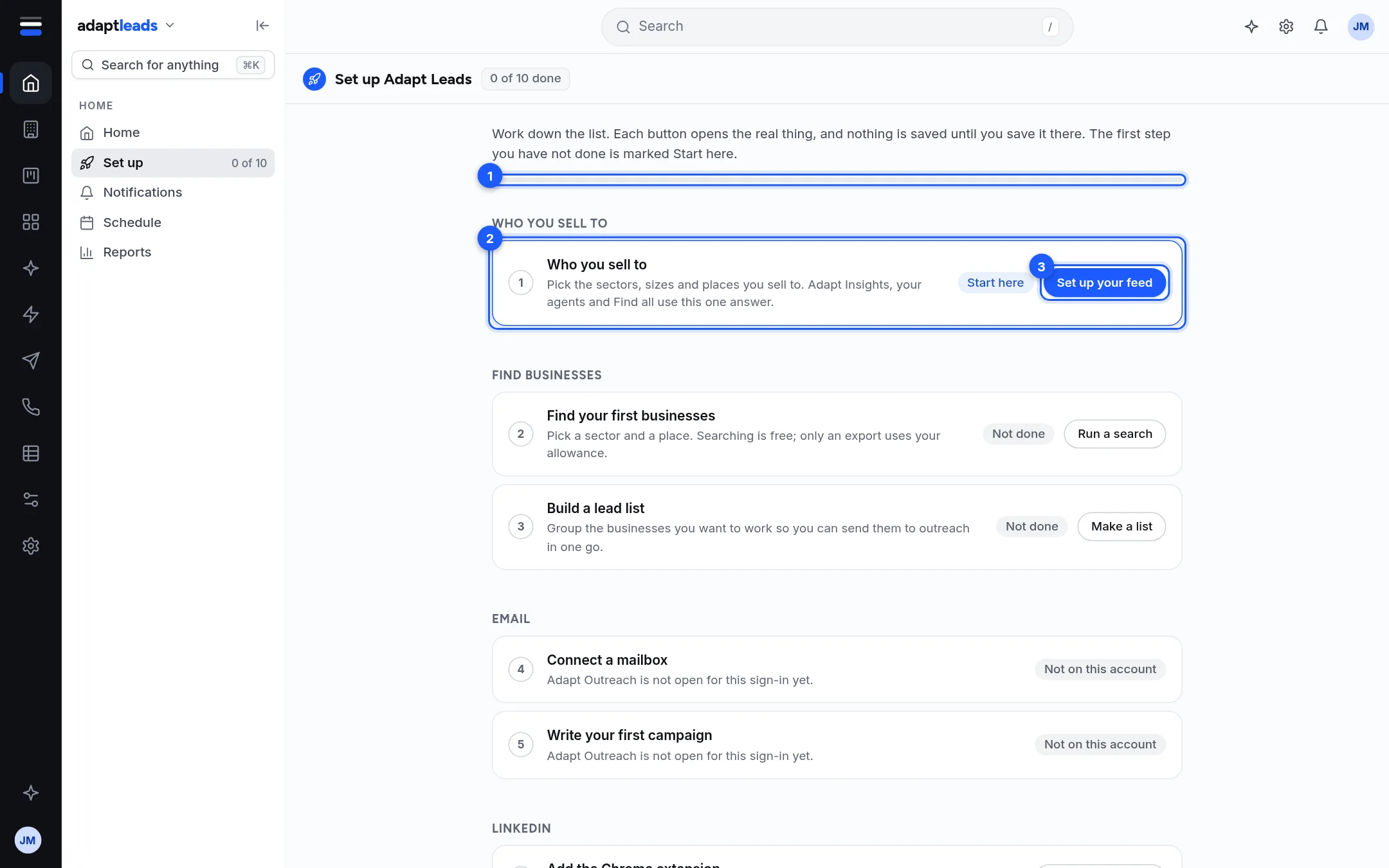
How to read it
| Mark | What it is |
|---|---|
| 1 | The bar and the title chip, such as "3 of 10 done". |
| 2 | The first step you have not done. It is marked Start here. |
| 3 | The button that opens that step. |
Cards are grouped under headings and numbered. Each shows a status.
| Status | Meaning |
|---|---|
| Start here | The first step still waiting on you. |
| Done | Adapt can see you have done it. |
| Needs you | Partly done. For example only your LinkedIn limits are saved, not your hours. |
| Not done | Waiting. |
| Checking | Still reading your account. |
| Could not check | The read failed. Press Try again. Nothing was changed. |
| Not on this account | This area is closed to your sign-in. It is not counted in the total. |
A new account (made in the last three days) lands on this page once by itself, in that browser.
The cards, in order
| Group | Card | Page |
|---|---|---|
| Who you sell to | Who you sell to | Set up: who you sell to |
| Find businesses | Find your first businesses; Build a lead list | Set up: find businesses and build a list |
| Connect a mailbox | Set up: connect a mailbox | |
| Write your first campaign | Set up: write your first campaign | |
| Add the Chrome extension | Set up: add the Chrome extension | |
| Your LinkedIn plan | Set up: your LinkedIn plan | |
| LinkedIn limits and hours | Set up: LinkedIn limits and hours | |
| Agents and calling | Your agents | Set up: your agents |
| Agents and calling | Set up the caller console | Set up: the caller console |
| Your workspace | Set up your CRM | Set up: your CRM |
| Your workspace | Your logo and colours | Set up: your logo and colours |
| Your workspace | Connect your calendar | Set up: connect your calendar |
Under the LinkedIn cards a note points to the LinkedIn Dashboard, which has its own longer set-up list that includes posting.
Limits
- The statuses come from what your account holds. Some can lag a few seconds after you save in another page.
- The page does not set anything up for you. It only reports and links.