Export businesses to a CSV file
Download revealed businesses as a CSV file, choose the columns, and see what it uses before you confirm.
You will have a CSV file of the businesses you chose, and you will have seen what it uses before it uses anything.
Before you start
Only businesses you have revealed go into a file. Reveal first. See Reveal a contact from the results table. Revealing does not use exports.
Steps
- Choose what to export. Either tick rows and use Export in the bar, or click Export at the top of a page: Businesses, Directors, a list, All revealed, a record.
- The Export sheet opens at the right. It says "from your selection", "from the list {name}" or "from everything you have revealed".
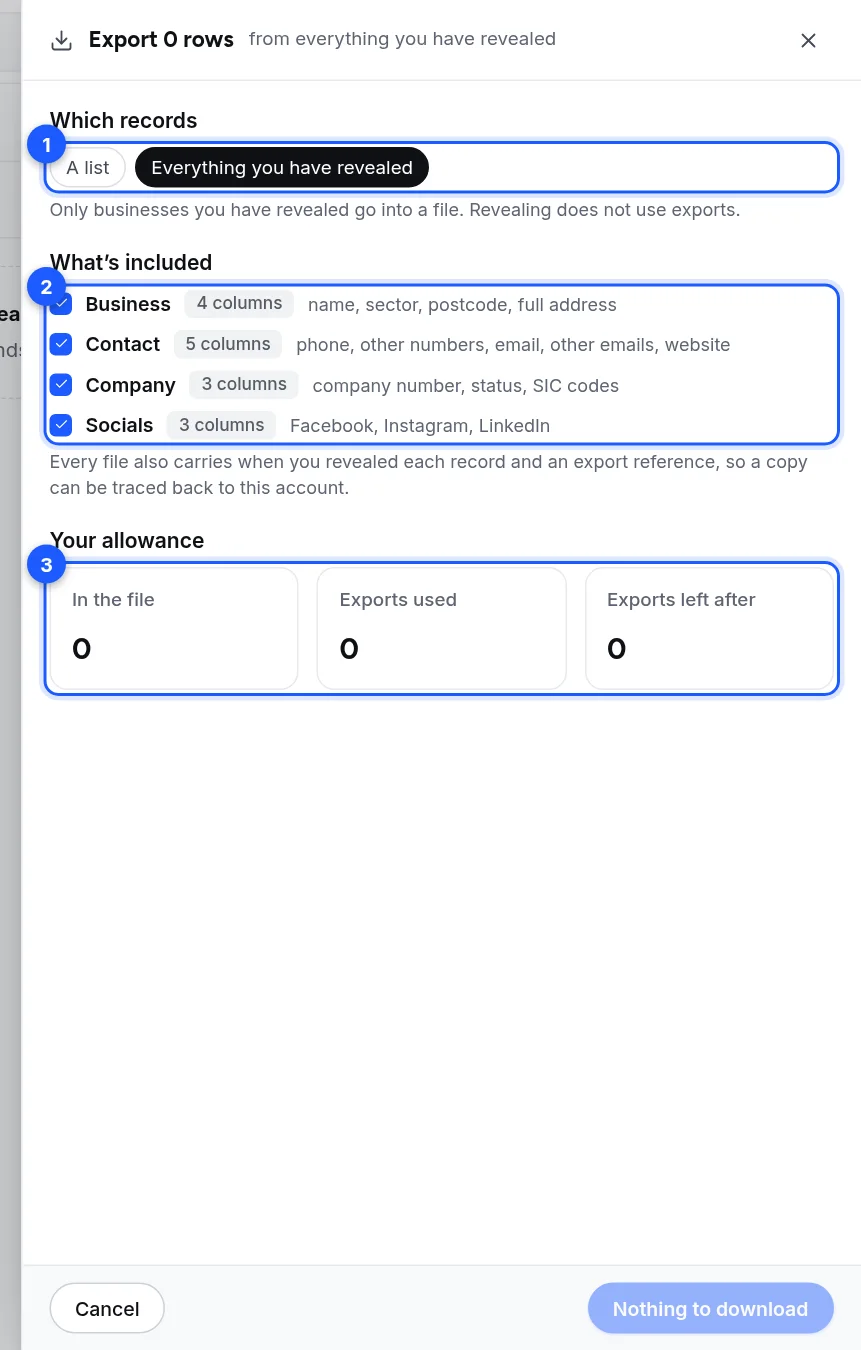
- Which records. Your selection, A list (pick it in the menu), or Everything you have revealed.
- What's included. Four groups of columns. Keep at least one.
-
Your allowance. In the file, Exports used and Exports left after. These are worked out before anything is counted.
-
Read the notes under the numbers. They say if some records were already exported this month, are not revealed yet, or do not fit in what is left.
- Click Download N rows.
- If the export uses some of your allowance, the sheet asks you to confirm: "This uses N of your M exports left this month. Downloading them again this month does not count again." Click Download to go ahead, or Back.
- The file downloads. The sheet says "Downloaded {file name}. N rows in the file." and how many exports were used and how many are left.
If nothing is in the file the button says "Nothing to download".
Columns you can choose
| Group | Columns |
|---|---|
| Business | name, sector, postcode, full address |
| Contact | phone, other numbers, email, other emails, website |
| Company | company number, status, SIC codes |
| Socials | Facebook, Instagram, LinkedIn |
Every file also carries when you revealed each record and an export reference, so a copy can be traced back to your account. You cannot turn those off.
Notes the sheet can show
- "N records were already exported this month, so they do not count again."
- "N businesses are not revealed yet, so not in the file." With a Reveal them first button when you chose rows. It reveals up to 500 at a time.
- "N records do not fit in what is left this month, so they are left out."
- "One file holds up to 25,000 records. N are left for another export."
- "Your allowance resets on {date}."
A check on the emails is offered in the sheet. See Check emails before you export.
If the allowance is used up
The sheet says "This month's exports are used up" and shows what the file needs and what is left. Nothing is counted. Your allowance resets on the 1st, or you can move to a bigger plan. See My export was refused.
What does not happen
- Exporting does not contact anyone.
- Exporting does not apply your suppression list. Check a file before you send from it. See Suppression and do-not-contact on lists and searches.