Add a deal with New prospect
Make a company, a person and a deal in one side panel, searching your CRM and the UK book as you type.
You will have a deal in a stage, linked to the company and, if you added one, the person.
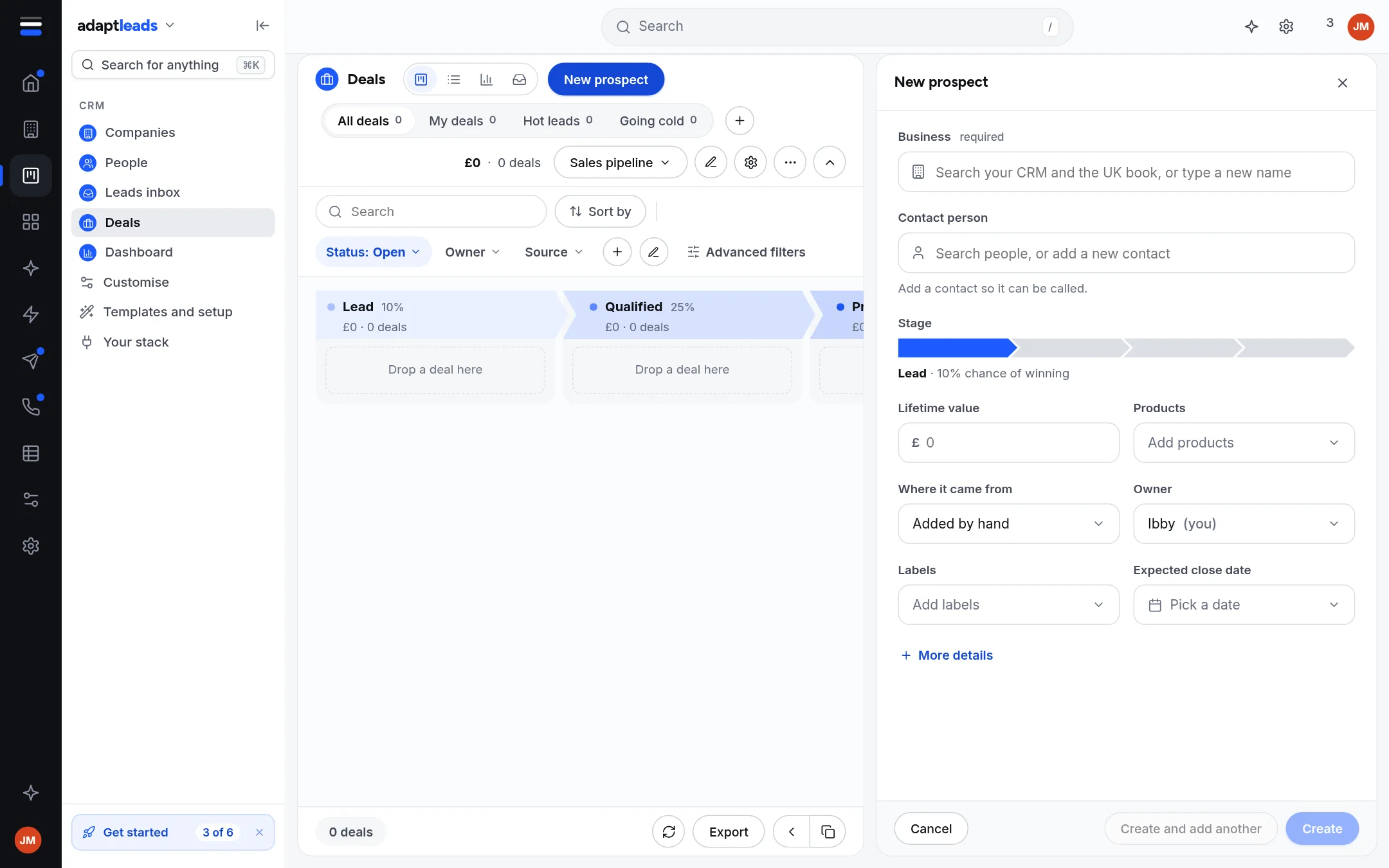
Steps
- Open Deals and press New prospect.
- In Business, start typing. Adapt searches your CRM and the UK book. Pick a result or type a new name.
- In Contact person, search your people or add a new contact. A contact is needed if the deal is to be called.
- Move along the Stage bar to the stage.
- Fill Lifetime value, Products, Where it came from, Owner, Labels and Expected close date as you wish. More details shows the rest.
- Press Create, or Create and add another to stay in the panel.
What happens
- Nothing is added until you press Create.
- Create makes the company (when it is new), the person (when they are new) and the deal, one at a time. If a later step is refused, it takes back what this click made. Records are hidden, never deleted.
- A UK book result brings only its name, place, website and a link back to the book. Its phone numbers and address stay in the book until you open the record there.
- New organisation, New contact and New client are the same panel in other modes, from the list pages. A client is a company, a person when there is one, and a deal moved to Won, made whole or not at all.
- Owner defaults to you.