A company record in the CRM
Read and work a company: its note box, tasks, activity, details and, where your setup allows it, its link to the UK book.
A company, a person and a deal each have a page with the same layout. Open one by clicking its name in a list.
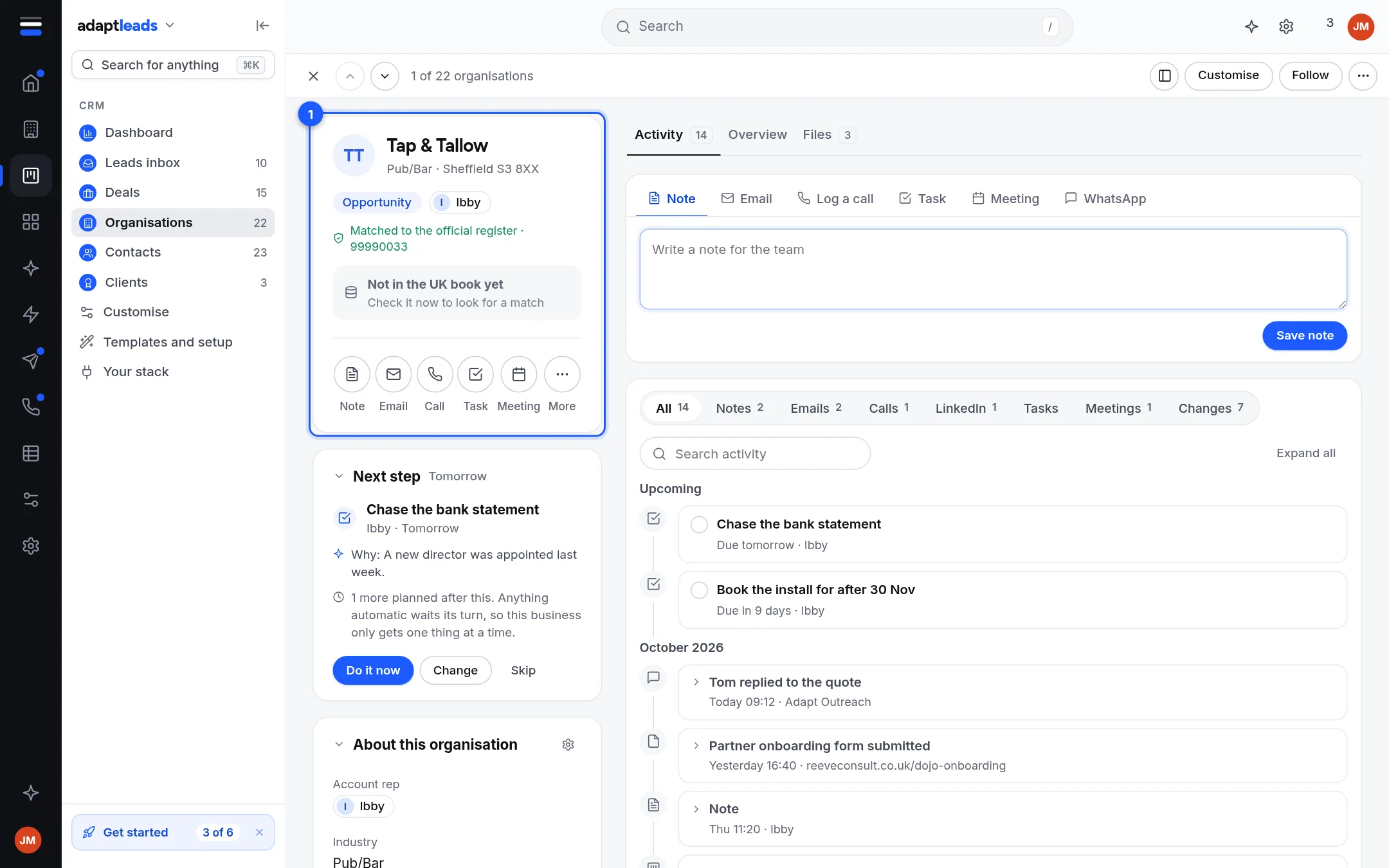
About the picture
The picture is a sample company in the demonstration CRM. Your Basic CRM starts empty, and the live page does not show the green "Matched" tick beside a company number or the Next step card.
The page
| Part | What it does |
|---|---|
| Header | Previous and next record, Customise (arrange the cards), Follow, and a More menu. |
| Name card | Name, status, owner, and a row of buttons: Note, Email, Call, Task, Meeting, More. |
| UK book card (1) | Whether the company is linked to a business in the UK book. See Link a CRM company to the UK book. |
| About this organisation | Its fields, grouped into sections. Click a field to edit it. One edit is one save, with a reason kept. |
| Composer (2) | Note, Email, Log a call, Task, Meeting, WhatsApp. |
| Activity (3) | Everything on the record, newest first. Filter by Notes, Emails, Calls, LinkedIn, Tasks, Meetings and Changes. Search it. Expand all. |
| Overview, Files tabs | Overview repeats the details. Files is not connected. |
On a person the page also lists their company and deals. On a deal it shows the stage, value and expected close.
What each action does today
| Action | Result |
|---|---|
| Note | Saved on the record for the team. See Notes and comments on a record. |
| Task and Meeting | A task, with a date. A meeting is a task with a date: there is no calendar invite. It appears on the Schedule. |
| Log a call you made | Writes a call line on the timeline. |
| Call from your phone | Opens your phone's dialler with the number. |
| Opens your mail app. Adapt does not send or file email from a record yet. | |
| Archive | Hides the record. A banner offers Bring it back. Nothing is deleted. |
| Customise | Moves, folds, hides or adds cards. It changes the page for you, in this browser only. |
Not connected
These say "Not connected yet" and change nothing: Files, WhatsApp, Merge duplicates, Clone this deal, Follow this record, Opt out of email, Enrol in a campaign, Send a LinkedIn invite and Send to the Caller console from a record. Invites are queued from LinkedIn Activities, inside your daily limits, never from a record.
No Smart Bcc yet
The live page has no Smart Bcc address for filing email from Gmail or Outlook.