Deals and pipelines
A deal is a chance to win something. The Deals page shows them as a board of stages, a list or a chart.
A deal is a company, usually a person at it, and a stage. The Deals page shows every deal as cards in stage columns.
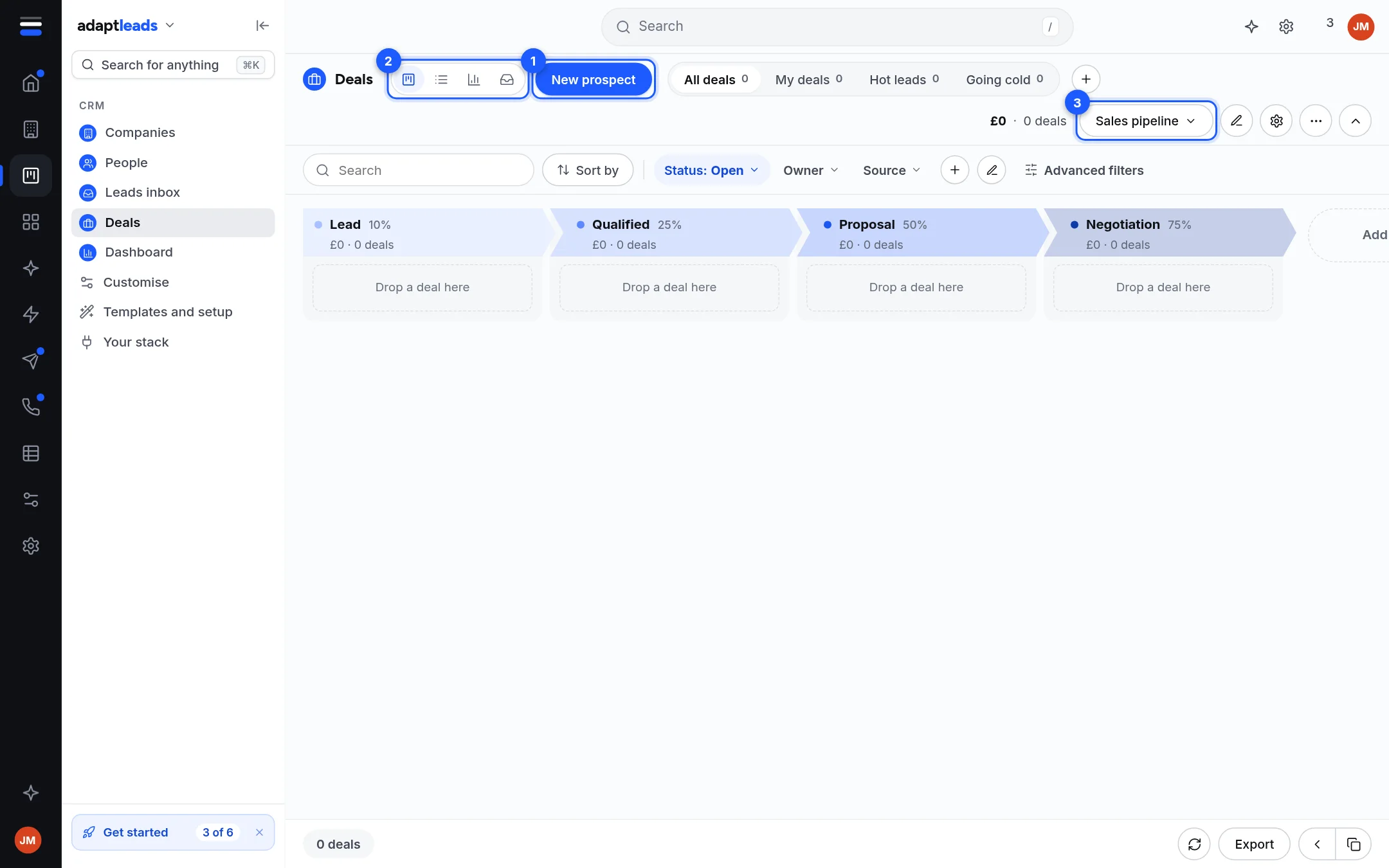
About the picture
A new Basic CRM is empty, so the board shows its six stages and "Drop a deal here". The stages are Lead 10%, Qualified 25%, Proposal 50%, Negotiation 75%, Won and Lost.
The page
| Part | What it does |
|---|---|
| New prospect (1) | Opens a side panel to add a deal. See Add a deal with New prospect. |
| Views (2) | Board, list, chart and inbox views of the same deals. |
| Tabs | All deals, My deals, Hot leads, Going cold, each with a count. |
| Total | The value and number of deals shown, such as "£0 · 0 deals". |
| Pipeline picker (3) | Which pipeline. A new CRM has one, Sales pipeline. |
| Status | Open, Won or Lost. The board shows Open by default. |
| Owner, Source | Quick filters. Advanced filters adds more. |
| Sort by, search | Find and order deals. |
| Export | A CSV of the deals shown. See Export records from the CRM. |
Each stage shows its win chance and the value and count of deals in it.
Move a deal
Drag a card to another column. The deal is saved in its new stage and the move is on its timeline. Moving to Won or Lost ends the deal. With the Basic automations on, Lost asks for a reason and Won and Lost stamp the day.
Open a deal
Click a card to open its page: stage, value, expected close, owner, source, notes, tasks and activity. Edits save one field at a time, with a reason kept in the change log. Archive hides a deal and offers to bring it back. See A company record in the CRM for the same layout on a company.
What does not happen
- Clone this deal and Merge duplicates are not connected yet.
- Changing stages, products and sources is read-only for now. See Customise the CRM.
- Nothing you do to a deal changes the UK book.
- A deal made from an email reply in Adapt Outreach is handed to your CRM by Create deal there.