Read a person record
What the person page shows for a director or contact, and what its buttons do.
A person record is the page for one named person at one business. Open it from a row on Directors, from the People tab of a company, or from a person chip.
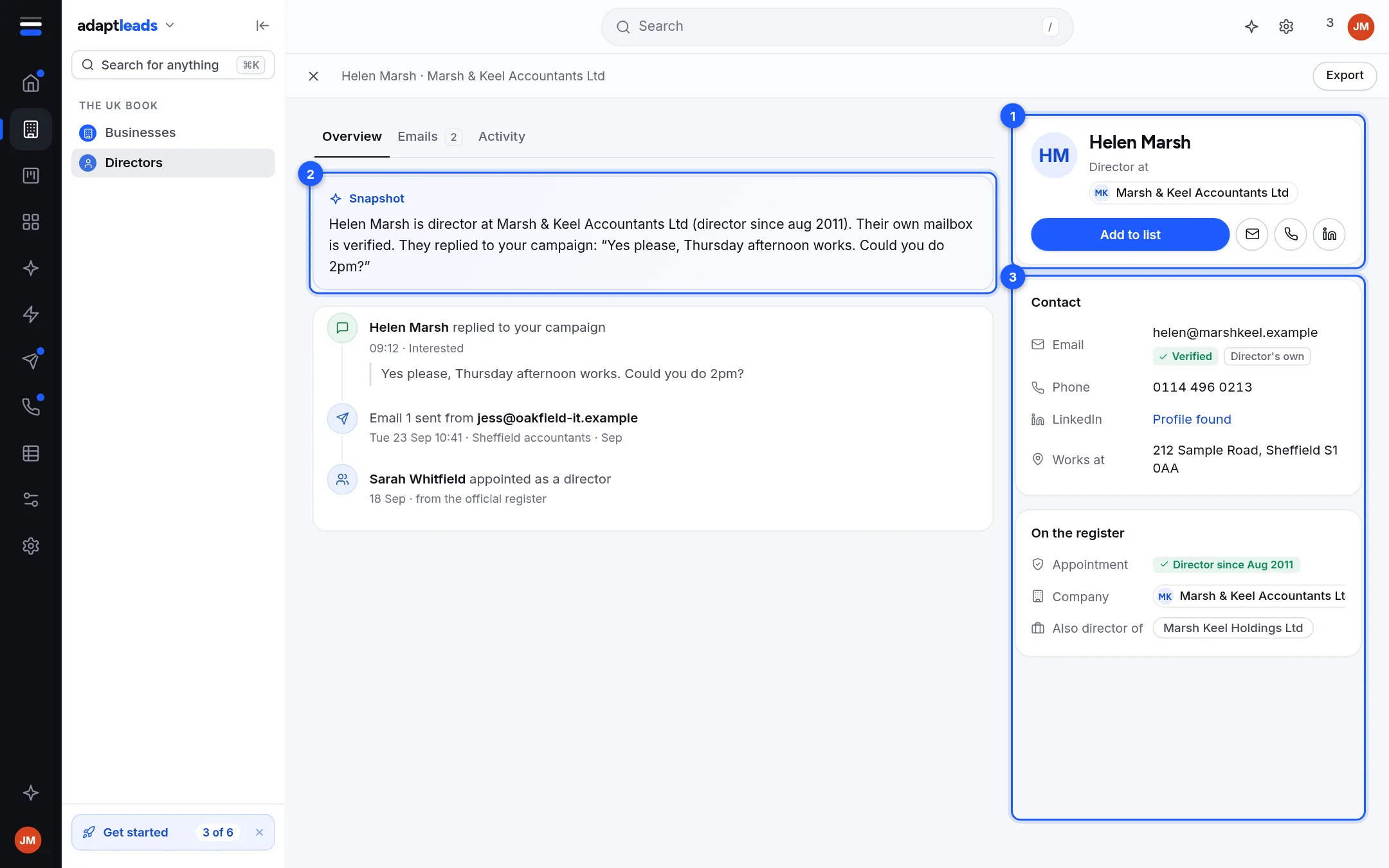
- Header and actions. The name, their title at the company, and the buttons.
- Snapshot. One plain sentence, for example "Helen Marsh is director at Marsh and Keel Accountants Ltd (director since Aug 2011). Their own mailbox is verified."
- Cards on the right. Contact, On the register, How we know.
The buttons
| Button | What it does |
|---|---|
| Add to list | Adds the business to a list. A person is added as their business; the list holds businesses. |
| Opens your email program to write to them. Greyed out with no email, or before reveal. | |
| Phone | Calls the business line. Greyed out with no phone, or before reveal. |
| Opens their profile if found, or a LinkedIn search for their name. | |
| Export | Exports the business record. |
| Cross | Back to where you came from. |
If the person is in your CRM, the header says "In your CRM" with a link.
The cards
Contact. Their email with its label and type tag, the business phone (labelled Business line, never a personal number), LinkedIn ("Profile found" or "None found") and where they work. Before you reveal, the email shows "Shows once the record is revealed".
On the register. If they are an officer of the company: the appointment, for example "Director since Aug 2011", the company, and the register's own spelling of their name if it differs, plus any other names they are known by. Otherwise it says they are not listed as an officer and their title is on file from other sources.
How we know. A chip for Name, Title and Email. See The labels on a record.
The tabs
- Overview. The snapshot, then recent activity.
- Emails. Appears only when a reply from this person is among your latest 50 in Unibox.
- Activity. Activity on the business.
What it does not do
- It does not show a personal mobile number. The only phone is the business line.
- A person who is not on the record any more gets the message "This person is not on the record any more", because the people on a record change as the register changes. Open the company instead.